
Every business — from a sole trader to an international corporation — generates receipts. Invoices, vendor slips, travel tickets, petrol receipts, coffee at a client meeting: the paper trail never ends. Yet most companies still handle this paper trail manually, costing time, introducing errors, and creating unnecessary stress at month-end and tax season.
Digital receipt management changes that equation entirely. By capturing, organising, and storing receipts electronically, you replace a box of crumpled paper with a searchable, audit-ready archive accessible from anywhere. In this guide, you will learn what digital receipt management involves, why it matters for businesses of every size, and how to build a system that works for your team.
What Is Digital Receipt Management?
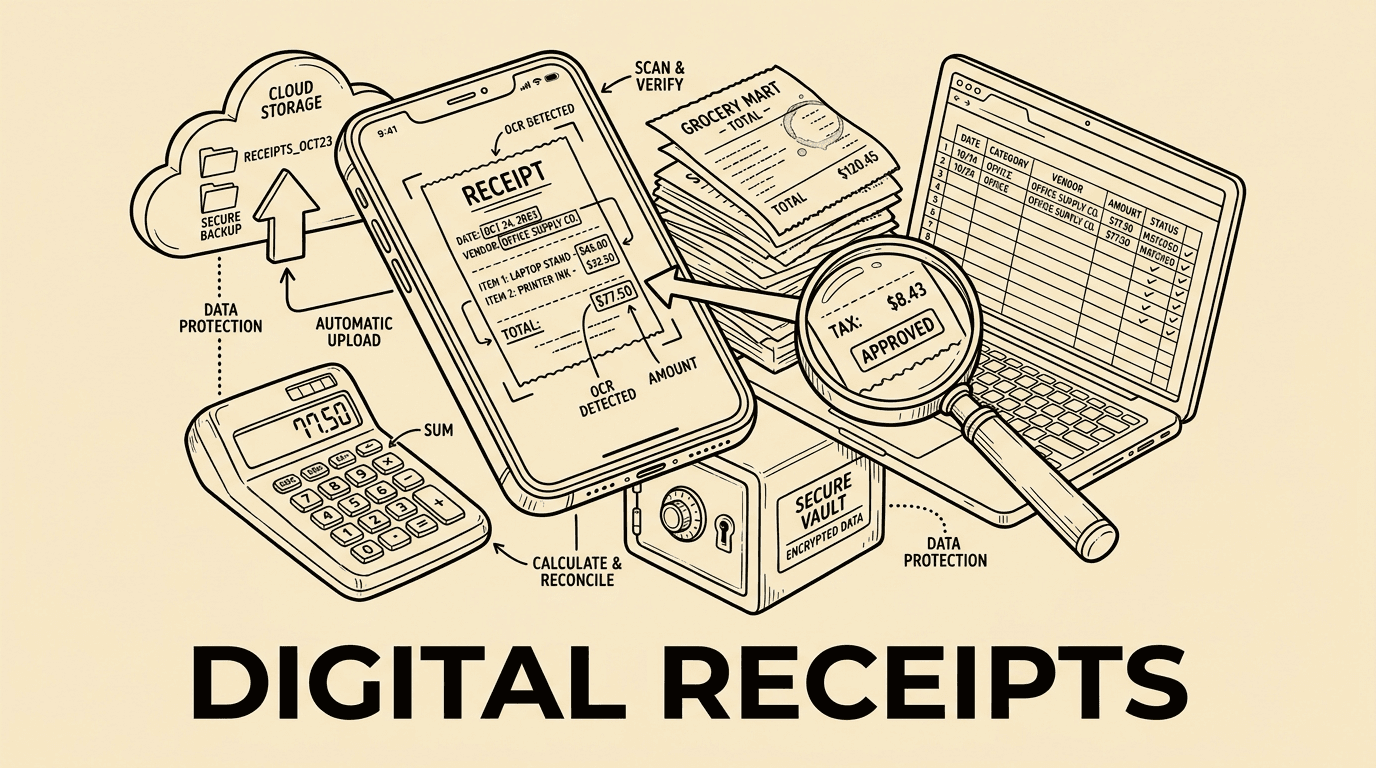
Digital receipt management is the process of capturing, storing, categorising, and retrieving receipts in electronic form rather than as physical paper documents. The process typically involves three stages:
- Capture: A receipt is photographed, scanned, or received electronically (email PDF or e-invoice).
- Extraction: Key data — vendor name, date, amount, VAT, currency — is read automatically using optical character recognition (OCR) or AI parsing.
- Storage and categorisation: The extracted data is linked to an accounting category, project, cost centre, or employee and stored in a secure, searchable system.
Modern tools, including expense management platforms like Bill.Dock, automate all three stages so that an employee can photograph a lunch receipt on a smartphone and have it correctly categorised and submitted for approval within seconds.
Why Paper Receipts Are a Business Risk
Paper receipts are fragile by design. Thermal paper fades within months, especially when exposed to heat or light. Receipts get lost in jacket pockets, crumpled in wallets, or accidentally thrown away. Even when kept carefully, organising and filing hundreds of slips each month is a manual burden that costs finance teams significant time.
Beyond operational inefficiency, paper-based receipt management creates real compliance risks:
- Audit exposure: Tax authorities in the UK, Germany, and across Europe require businesses to retain receipts for between six and ten years. Missing documentation can trigger assessments and penalties.
- Duplicate claims: Without a central digital record, it is easy for the same receipt to be submitted more than once, either by accident or fraudulently.
- Inaccurate reporting: Manual entry of receipt amounts is error-prone. Even small transcription mistakes compound into material discrepancies over a financial year.
- Month-end bottlenecks: Finance teams that rely on physical receipts spend days chasing employees and reconciling documents when they should be closing the books.
Key Benefits of Going Digital
Speed and Efficiency
Capturing a receipt digitally at the point of purchase takes seconds. OCR technology extracts the key data automatically, eliminating manual data entry. Approval workflows are triggered immediately, rather than waiting for an employee to return to the office with a wallet full of paper.
Accuracy and Data Quality
When software reads a receipt rather than a human transcribing it, data quality improves significantly. Modern OCR engines combined with AI validation can correctly identify amounts, dates, and VAT numbers even on poor-quality images. Exceptions are flagged for human review rather than silently entered incorrectly.
Compliance and Audit Readiness
Digitally stored receipts with a timestamp, source metadata, and an unbroken audit trail satisfy the legal requirements of most European tax authorities. In Germany, the GoBD regulations specify that digital documents must be stored in a way that ensures they are complete, correct, and reproducible — requirements that a well-configured digital receipt system meets by default.
Cost Reduction
Research consistently shows that processing a paper expense report costs between three and five times more than processing a digital one. When you factor in printing, storage, courier costs for remote teams, and the staff hours spent on manual reconciliation, the total cost of paper-based receipt management is substantially higher than most organisations realise.
Visibility and Control
With paper receipts, finance leaders typically see spending data weeks after it is incurred. Digital systems provide near-real-time visibility into expense patterns, enabling proactive budget management rather than reactive month-end firefighting.
Core Features to Look for in a Digital Receipt System
Not every digital receipt solution is equal. When evaluating tools, look for the following capabilities:
Mobile Capture
Employees incur expenses on the road, at client sites, and during travel. A mobile app with a reliable receipt scanning function is essential. The best solutions use AI-powered image processing to handle angled shots, low light, and partial receipts gracefully.
OCR and AI Data Extraction
Manual data entry defeats the purpose of going digital. Look for automatic extraction of at least: merchant name, transaction date, total amount, tax amount, currency, and payment method.
Multi-Currency Support
For any business with international travel or cross-border procurement, automatic currency conversion using real-time exchange rates is a must. This eliminates manual conversion and ensures consistent reporting in your home currency.
Integration with Accounting Software
Digital receipts have the most value when they flow directly into your general ledger. Look for native integrations with platforms such as DATEV, SAP, QuickBooks, Xero, or Sage, as well as open API access for custom workflows.
Approval Workflows
Configurable approval chains ensure that expenses above certain thresholds or in specific categories are reviewed by the right people before reimbursement or booking occurs. Automated reminders reduce chasing and speed up cycle times.
Audit Trail
Every action on a receipt — upload, read, categorise, approve, reject, export — should be timestamped and attributed to a named user. This immutable log satisfies auditors and resolves internal disputes without ambiguity.
Secure Cloud Storage
Receipts should be stored in an encrypted, geographically redundant cloud environment with role-based access controls. Retention policies should be configurable to match local legal requirements (six years in the UK, ten years in Germany).
Implementation Best Practices
Start with a Pilot Group
Rolling out digital receipt management to your entire organisation at once can be disruptive. Start with a small team — perhaps a single department or a group of frequent travellers — to identify workflow gaps, train champions, and refine your configuration before a broader rollout.
Establish a Clear Expense Policy
Technology alone cannot prevent policy violations. Define clearly which expense categories are permitted, what spending limits apply, which receipts are mandatory, and what the consequences of non-compliance are. Communicate this policy actively and embed it in your digital system's approval rules.
Train Employees on Capture Quality
The accuracy of OCR extraction depends on image quality. Train employees to capture receipts on a flat, well-lit surface, ensuring all four corners of the document are visible. Most modern platforms also offer image quality feedback at the point of capture.
Set Submission Deadlines
Define and enforce deadlines for receipt submission — ideally within 24 to 48 hours of the transaction. Delayed submissions lead to stale memories, lost receipts, and month-end crunches.
Integrate Early
Connect your receipt management system to your accounting platform as early as possible in the implementation. Early integration prevents the accumulation of manual reconciliation work and ensures that financial reporting benefits from day one.
Digital Receipt Management and Tax Compliance
Tax compliance is one of the most compelling arguments for digitalising receipt management. In the United Kingdom, HMRC requires businesses to retain records for at least six years. In Germany, GoBD regulations mandate that digitised receipts are stored with original file integrity and are retrievable within a reasonable time. Denmark's Bogføringsloven, the Netherlands' bewaarplicht, and equivalent legislation across Scandinavia all impose similar obligations.
A well-configured digital receipt system addresses these requirements directly by:
- Creating a date-stamped, tamper-evident record of each captured document.
- Storing original images alongside extracted data so that the source document is always available.
- Providing export and retrieval functions that allow auditors or tax advisors to access specific records quickly.
- Maintaining a full audit trail of every access and modification event.
Some platforms, including Bill.Dock, are specifically designed to meet GoBD requirements, providing businesses operating in the DACH region with confidence that their digital records will withstand scrutiny.
Common Mistakes to Avoid
Using Consumer Apps for Business Receipts
Free consumer apps may seem attractive, but they typically lack the security, retention guarantees, and compliance features that businesses require. Using consumer tools for business receipts creates liability and may void compliance certifications.
Failing to Archive Originals
In some jurisdictions, tax authorities still require the original paper receipt to be retained alongside a digital copy for a defined period. Check local regulations before disposing of paper originals.
Skipping the Approval Layer
Digital capture without digital approval workflows is only a partial solution. Without structured approval, erroneous or fraudulent receipts can still reach the general ledger unchallenged.
Neglecting Employee Training
Poor image quality is the single most common cause of OCR failure. Invest time in training employees — particularly those who travel frequently — on best-practice capture techniques.
Benchmarking and Industry Data
Understanding how leading organisations manage receipts helps finance teams benchmark their own operations and build the business case for investment:
- Businesses that use automated receipt capture report a reduction in processing time of 60–75% compared to manual methods (Aberdeen Group, Finance Operations research).
- Finance teams that use digital receipt management close their monthly books an average of 3–5 days faster than those relying on paper (ACFE industry data).
- Duplicate receipt submissions account for an estimated 2–5% of all expense claims in organisations without automated duplicate detection.
- Companies with digital receipt systems report a 30–40% reduction in year-end audit preparation time, as documentation is already organised and retrievable.
Data Protection and GDPR Considerations
Receipt data can contain personal information — employee names, locations, dietary preferences inferred from restaurant visits, and travel patterns. Under GDPR, this data must be handled with appropriate safeguards:
- Process only the data necessary for legitimate business purposes (data minimisation).
- Establish a clear retention policy and delete data that is no longer needed for tax or legal purposes.
- Ensure that your receipt management provider processes data within the EEA or under an approved transfer mechanism.
- Maintain a record of processing activities that covers receipt-related data.
Reputable expense management platforms publish their data processing agreements and can act as processors under your GDPR framework, simplifying compliance obligations.
Frequently Asked Questions
Are digital receipts legally valid in the UK?
Yes. HMRC accepts digital receipts as evidence for VAT reclaim and tax purposes, provided the digital copy is a faithful reproduction of the original and is retained for the required period. The original paper receipt may be discarded once a compliant digital copy exists, though checking with your tax adviser is recommended.
How long must I keep digital receipts?
In the UK, HMRC requires records to be kept for six years from the end of the relevant accounting period. In Germany, GoBD requires ten years. Other European jurisdictions typically require between five and ten years. Your digital receipt system should be configured to enforce the correct retention period for your jurisdiction.
What happens if a receipt image is too blurry to read?
Modern platforms flag low-quality images immediately, prompting the employee to retake the photo. If the original receipt is lost, most systems allow employees to enter data manually with a note explaining the missing document. Your expense policy should specify how missing receipts are handled.
Can digital receipt management integrate with my existing accounting software?
Most modern receipt management platforms offer integrations with major accounting software. Bill.Dock, for example, supports exports to DATEV and standard formats compatible with SAP, Xero, and QuickBooks. Always verify integration compatibility before committing to a new platform.
Is digital receipt management suitable for small businesses?
Absolutely. Small businesses often benefit most from digital receipt management because they have fewer dedicated finance resources to handle manual processing. A small team of ten employees submitting five receipts each per week still generates over 2,600 documents per year — a significant manual burden that digital tools eliminate almost entirely.
Conclusion
Digital receipt management is no longer a luxury reserved for large enterprises. The technology is accessible, the compliance benefits are compelling, and the operational savings are measurable. By replacing paper receipts with a structured digital workflow, businesses improve accuracy, reduce costs, accelerate month-end closing, and maintain the audit-ready records that tax authorities require.
The question is not whether to go digital, but how quickly you can make the transition.