
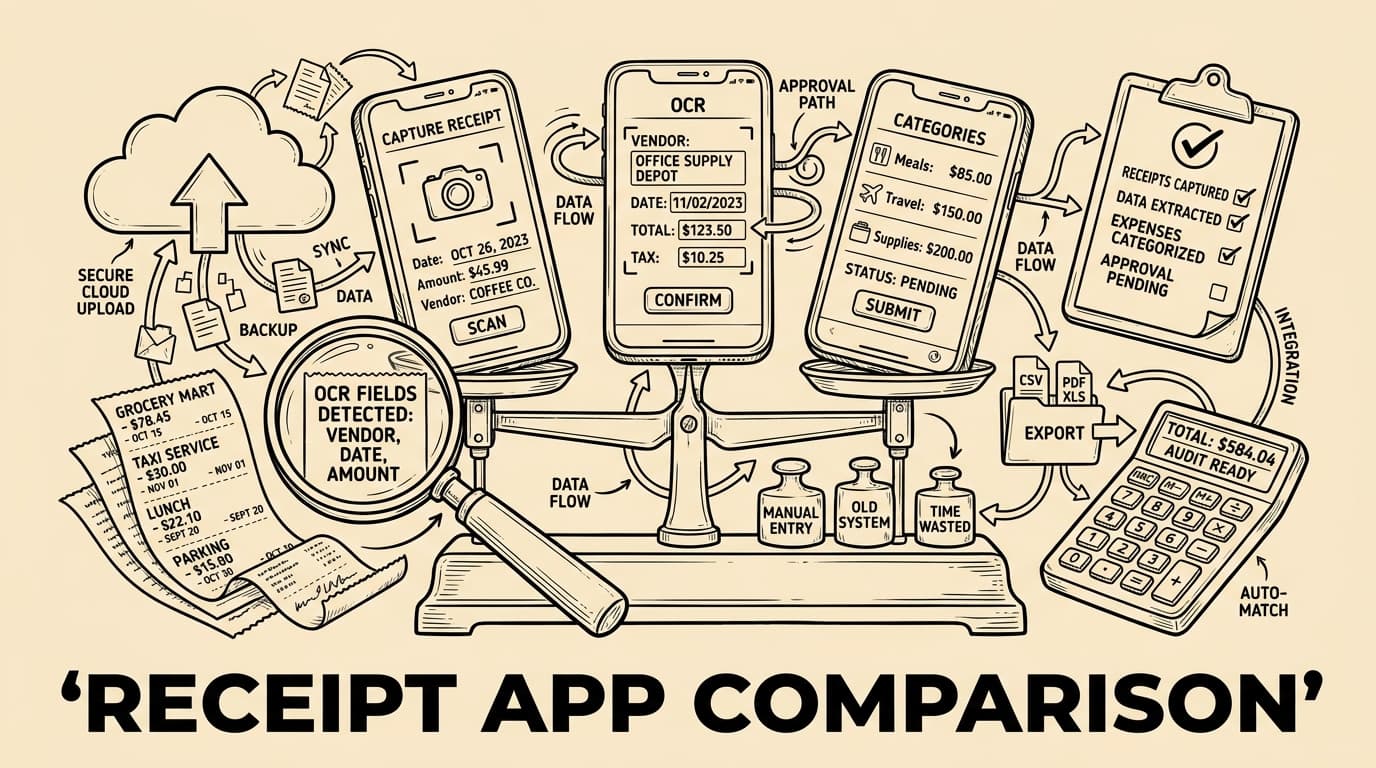
Choosing a receipt management app is no longer a small back-office decision. The right tool changes how employees submit expenses, how managers approve spend, how accountants receive evidence, and how quickly finance can close the month. This comparison guide explains what to evaluate before you buy: capture quality, OCR, approvals, card matching, exports, tax evidence, security, pricing and rollout risk.
What a receipt management app should solve
A receipt management app is worth comparing because the category looks simple until month end arrives. The tool must capture receipts, read merchant, date, tax and amount with OCR, connect each claim to an approval workflow, and leave a reliable audit trail. If it only stores photos, finance still has to chase context, correct categories and rebuild the story behind every transaction.
The strongest products reduce friction for employees and risk for finance at the same time. Look at capture speed, duplicate detection, card matching, policy checks, searchable storage, role permissions and export depth. A cheap app that saves ten seconds at upload but creates manual corrections during close is not cheaper in practice.
Comparison criteria that matter
OCR quality should be tested on real receipts: faded thermal paper, hotel invoices, restaurant bills, toll tickets, multiple VAT rates, foreign currencies and long merchant names. Accuracy is not only reading text; it is mapping fields to the correct accounting data and showing confidence when human review is needed.
Mobile experience decides adoption. Employees should be able to photograph a receipt, add business purpose, project, attendees and payment method, then submit without training. Offline capture, email forwarding and multi-language UI matter for travelling teams. If capture is annoying, the app becomes another source of late documents.
- Capture quality
- OCR accuracy
- Approval logic
- Export depth
- Security
OCR quality and data extraction
Workflow depth separates a receipt archive from an expense management system. Approvals should reflect amount, category, department, project and exception logic. Finance needs override rights, comments, escalation paths and reporting on repeated policy breaches. The goal is fewer arguments, not more administrative layers.
Exports determine whether the app actually helps bookkeeping. Compare accounting formats, API availability, attachment transfer, tax code mapping, cost centres, supplier recognition and reconciliation with cards or bank feeds. For international teams, check multi-currency handling, tax evidence and export formats for every country you operate in.
Mobile capture and employee experience
Security and retention are not optional. Review encryption, user roles, deletion rules, audit logs, data residency, backup, and whether original images remain accessible for the retention period. Finance teams should know exactly who changed a record and when.
Pricing should be evaluated against total process cost. Count submitters, approvers, accountants, storage, integrations, onboarding and support. A pilot with twenty users often reveals hidden work: training questions, missing integrations, policy gaps and reports the CFO expects but the vendor demo skipped.
Approval workflows and policy controls
Tools like Bill.Dock combine receipt capture, AI extraction, duplicate checks, approvals and accountant-ready exports in one workflow. The best choice is usually not the longest feature list; it is the tool that fits your policies, exports cleanly, and makes correct submission easier than manual workarounds.
A receipt management app is worth comparing because the category looks simple until month end arrives. The tool must capture receipts, read merchant, date, tax and amount with OCR, connect each claim to an approval workflow, and leave a reliable audit trail. If it only stores photos, finance still has to chase context, correct categories and rebuild the story behind every transaction.
- Capture quality
- OCR accuracy
- Approval logic
- Export depth
- Security
Accounting exports and tax evidence
The strongest products reduce friction for employees and risk for finance at the same time. Look at capture speed, duplicate detection, card matching, policy checks, searchable storage, role permissions and export depth. A cheap app that saves ten seconds at upload but creates manual corrections during close is not cheaper in practice.
OCR quality should be tested on real receipts: faded thermal paper, hotel invoices, restaurant bills, toll tickets, multiple VAT rates, foreign currencies and long merchant names. Accuracy is not only reading text; it is mapping fields to the correct accounting data and showing confidence when human review is needed.
Security, storage and audit trail
Mobile experience decides adoption. Employees should be able to photograph a receipt, add business purpose, project, attendees and payment method, then submit without training. Offline capture, email forwarding and multi-language UI matter for travelling teams. If capture is annoying, the app becomes another source of late documents.
Workflow depth separates a receipt archive from an expense management system. Approvals should reflect amount, category, department, project and exception logic. Finance needs override rights, comments, escalation paths and reporting on repeated policy breaches. The goal is fewer arguments, not more administrative layers.
Pricing, rollout and change management
Exports determine whether the app actually helps bookkeeping. Compare accounting formats, API availability, attachment transfer, tax code mapping, cost centres, supplier recognition and reconciliation with cards or bank feeds. For international teams, check multi-currency handling, tax evidence and export formats for every country you operate in.
Security and retention are not optional. Review encryption, user roles, deletion rules, audit logs, data residency, backup, and whether original images remain accessible for the retention period. Finance teams should know exactly who changed a record and when.
- Capture quality
- OCR accuracy
- Approval logic
- Export depth
- Security
Comparison checklist
Pricing should be evaluated against total process cost. Count submitters, approvers, accountants, storage, integrations, onboarding and support. A pilot with twenty users often reveals hidden work: training questions, missing integrations, policy gaps and reports the CFO expects but the vendor demo skipped.
Tools like Bill.Dock combine receipt capture, AI extraction, duplicate checks, approvals and accountant-ready exports in one workflow. The best choice is usually not the longest feature list; it is the tool that fits your policies, exports cleanly, and makes correct submission easier than manual workarounds.
FAQ
A receipt management app is worth comparing because the category looks simple until month end arrives. The tool must capture receipts, read merchant, date, tax and amount with OCR, connect each claim to an approval workflow, and leave a reliable audit trail. If it only stores photos, finance still has to chase context, correct categories and rebuild the story behind every transaction.
The strongest products reduce friction for employees and risk for finance at the same time. Look at capture speed, duplicate detection, card matching, policy checks, searchable storage, role permissions and export depth. A cheap app that saves ten seconds at upload but creates manual corrections during close is not cheaper in practice.
| Capability | Why it matters | Question to ask |
|---|---|---|
| OCR | Less typing and fewer corrections | Can it read real messy receipts? |
| Approvals | Controls spend before export | Can rules vary by amount and category? |
| Exports | Reduces accounting cleanup | Does it export attachments and tax codes? |
| Audit trail | Supports reviews and retention | Who changed what and when? |
Mobile capture and employee experience
Mobile experience decides adoption. Employees should be able to photograph a receipt, add business purpose, project, attendees and payment method, then submit without training. Offline capture, email forwarding and multi-language UI matter for travelling teams. If capture is annoying, the app becomes another source of late documents.
OCR quality and data extraction
OCR quality should be tested on real receipts: faded thermal paper, hotel invoices, restaurant bills, toll tickets, multiple VAT rates, foreign currencies and long merchant names. Accuracy is not only reading text; it is mapping fields to the correct accounting data and showing confidence when human review is needed.
Comparison criteria that matter
The strongest products reduce friction for employees and risk for finance at the same time. Look at capture speed, duplicate detection, card matching, policy checks, searchable storage, role permissions and export depth. A cheap app that saves ten seconds at upload but creates manual corrections during close is not cheaper in practice.
What a receipt management app should solve
A receipt management app is worth comparing because the category looks simple until month end arrives. The tool must capture receipts, read merchant, date, tax and amount with OCR, connect each claim to an approval workflow, and leave a reliable audit trail. If it only stores photos, finance still has to chase context, correct categories and rebuild the story behind every transaction.
FAQ
How many apps should we shortlist?
Three to five is enough: one lightweight mobile tool, one accounting-native option, and one full expense workflow platform.
Is OCR accuracy the most important feature?
It is important, but not sufficient. Approvals, exports, duplicate checks and audit evidence decide whether finance saves time.
Should small teams use a spreadsheet instead?
A spreadsheet can work briefly, but it breaks down when receipts are late, VAT evidence matters or several people submit expenses.
What should a pilot test include?
Use real receipts, real approvers, accounting export, card matching, exception handling and month-end reporting before signing.
Conclusion
The best receipt management app is the one that makes correct behaviour easy. Employees should capture receipts quickly, managers should approve consistently, and finance should export clean evidence without rebuilding context. Compare tools with real documents, real approval rules and real accounting exports before committing.